> ## Documentation Index
> Fetch the complete documentation index at: https://docs.superu.ai/llms.txt
> Use this file to discover all available pages before exploring further.
# Introduction
> Build, test, and ship with the SuperU API
SuperU API lets you create and manage voice agents, place calls, handle tools, organize folders, and work with contacts, audiences, and knowledge bases.
## Try the API in Google Colab
Want the full hands-on experience without setting up a local project? Open our ready-to-run Google Colab notebook with all core API functions already configured for you to test.
Run SuperU API examples directly in your browser and experiment with agents, calls, tools, contacts, audiences, and knowledge bases.
## Authentication
Use your API key in the `superU-Api-Key` header for all secured endpoints.
```http theme={null}
superU-Api-Key: 5jrcxxxxxxxxxxxxxx4b98
```
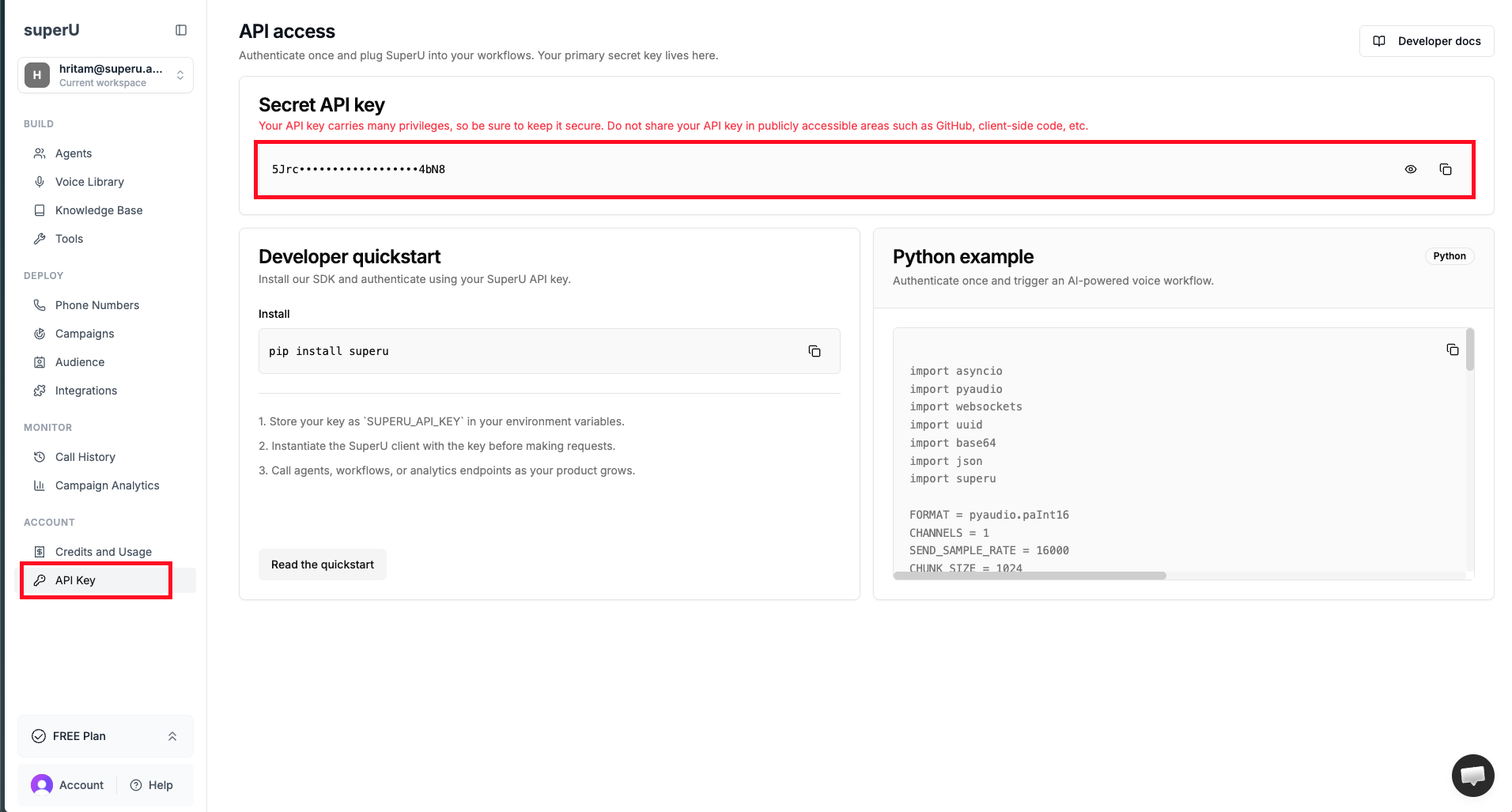
## Where to find your API key
You can generate and copy API keys from the SuperU dashboard.
1. Go to [workspace.superu.ai](https://workspace.superu.ai)
2. Open the API keys section
3. Copy the existing key and use it
 ## Installation
```bash theme={null}
pip install superu
```
## Quick Start Example
```python Python theme={null}
import superu
client = superu.SuperU("your_api_key")
# 1) List existing agents
agents = client.agents.list(limit=5)
print(agents)
# 2) Start an outbound call
call = client.calls.create_outbound_call(
assistant_id="assistant_id_from_dashboard",
to="+15557654321",
campaign_id="demo_call",
customer_name="Ava",
customer_id="cust_123"
)
print(call)
```
## API Playground
Every endpoint page in this section includes:
* Interactive `Try it` requests
* Auto-generated request examples
* Copy-ready code examples in `cURL` and `Python`
* Success and error response blocks
## Common Status Codes
These status codes are now documented across the API, including endpoint-level error examples.
* `200` Success
* `201` Created
* `400` Bad Request
* `401` Unauthorized
* `404` Not Found
* `500` Internal Server Error
* `501` Not Implemented
## Endpoint Groups
* [Calls](/api-reference/calls/create-twilio-call)
* [Agents](/api-reference/agents/create-agent)
* [Agent Versions](/api-reference/agent-versions/create-agent-version)
* [Phone Numbers](/api-reference/phone-numbers/get-owned-phone-numbers)
* [Call Logs](/api-reference/call-logs/get-call-logs)
* [Tools](/api-reference/tools/create-tool)
* [Folders](/api-reference/folders/create-folder)
* [Contacts](/api-reference/contacts/create-contact)
* [Audiences](/api-reference/audiences/create-audience)
* [Knowledge Base](/api-reference/knowledge-base/create-knowledge-base)
## Installation
```bash theme={null}
pip install superu
```
## Quick Start Example
```python Python theme={null}
import superu
client = superu.SuperU("your_api_key")
# 1) List existing agents
agents = client.agents.list(limit=5)
print(agents)
# 2) Start an outbound call
call = client.calls.create_outbound_call(
assistant_id="assistant_id_from_dashboard",
to="+15557654321",
campaign_id="demo_call",
customer_name="Ava",
customer_id="cust_123"
)
print(call)
```
## API Playground
Every endpoint page in this section includes:
* Interactive `Try it` requests
* Auto-generated request examples
* Copy-ready code examples in `cURL` and `Python`
* Success and error response blocks
## Common Status Codes
These status codes are now documented across the API, including endpoint-level error examples.
* `200` Success
* `201` Created
* `400` Bad Request
* `401` Unauthorized
* `404` Not Found
* `500` Internal Server Error
* `501` Not Implemented
## Endpoint Groups
* [Calls](/api-reference/calls/create-twilio-call)
* [Agents](/api-reference/agents/create-agent)
* [Agent Versions](/api-reference/agent-versions/create-agent-version)
* [Phone Numbers](/api-reference/phone-numbers/get-owned-phone-numbers)
* [Call Logs](/api-reference/call-logs/get-call-logs)
* [Tools](/api-reference/tools/create-tool)
* [Folders](/api-reference/folders/create-folder)
* [Contacts](/api-reference/contacts/create-contact)
* [Audiences](/api-reference/audiences/create-audience)
* [Knowledge Base](/api-reference/knowledge-base/create-knowledge-base)